May 20, 2026 • Marlowe Finch • 9 min reading time • Specs verified June 4, 2026
Inflatable Movie Screens Sized Right: Matching 14ft to 30ft Blow-Ups to Your Yard and Projector
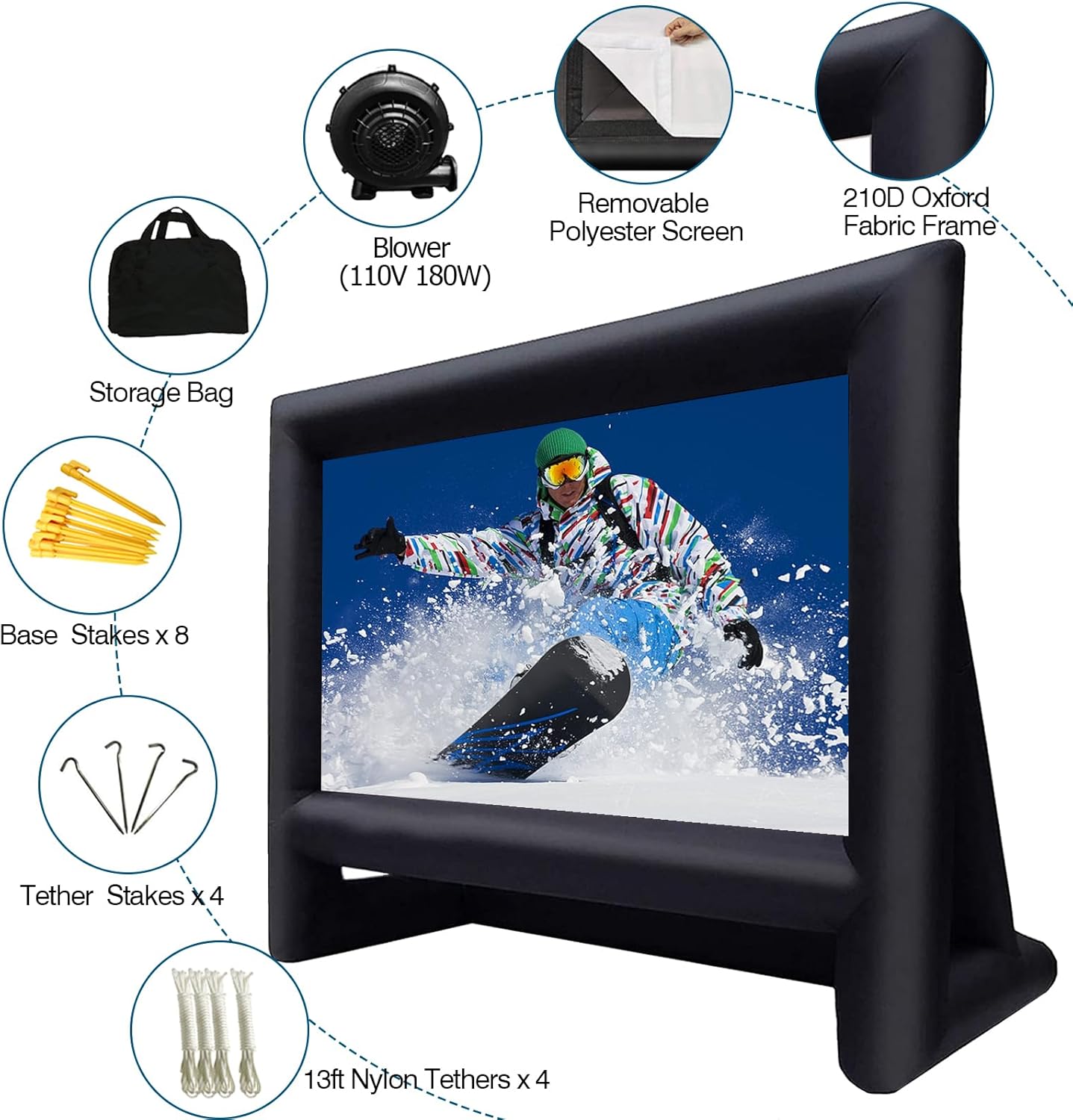
An inflatable movie screen is exactly what it sounds like: a self-standing screen that you blow up with an included electric fan or blower, stake into the ground, and use as your projection surface outdoors. Unlike a fixed frame screen mounted to a wall, an inflatable packs into a carry bag and sets up in 10–20 minutes. The catch — and it’s the one most buyers miss — is that screen size and projector output are locked in a direct relationship. A 20-foot-wide screen needs roughly four times the projector brightness of a 10-foot screen to deliver the same image quality. Get that pairing wrong and you’ve spent $300–$600 on a screen that turns your $800 projector into an underwhelming slideshow. This guide walks through the sizing math, helps you match screen width to your actual yard and seating layout, and tells you which screen sizes make sense for which projector tiers — so you can commit to a configuration with confidence.
| EDITOR'S PICKInflatable Screen Outdoor 30ft… | Mid-tierInflatable Projector Screen | Budget pick[XHYCPY 16ft Inflatable Movie Sc](https://www.amazon.com/dp/B07JZ167G8?tag=greenflower20-20)… | |
|---|---|---|---|
| Screen Width | 30ft | 24ft | 16ft |
| Projection Type | Front & Rear | Front & Rear | Front/Rear |
| Storage Bag | — | — | ✓ |
| Price | $269.99 | $162.99 | $98.99 |
| See on Amazon → | See on Amazon → | See on Amazon → |
Why Screen Size and Projector Brightness Are Inseparable
Before you shop screen diameter, you need to understand one principle: lumens per square foot of screen surface. Projector brightness is measured in ANSI lumens (a standardized output number). The image that actually reaches your eye depends on how many of those lumens are spread across the screen area. Double the screen width and you’ve roughly quadrupled the surface area — and quartered the perceived brightness on any given square foot.
Projector Central’s projection calculator (an indispensable free tool) lets you plug in projector model and throw distance to see recommended screen sizes, but it won’t simulate the ambient light your backyard actually has at 8 p.m. in July. That step is yours to do on-site.
A reasonable working rule, synthesized from aggregated guidance across Sound & Vision’s projector coverage and AVS Forum’s outdoor theater threads, is:
By the numbers
| Screen Width | Min Projector Output (dark yard) | Min Output (suburban dusk/partial light) |
|---|---|---|
| 14 ft | 1,500 ANSI lm | 2,500 ANSI lm |
| 16–18 ft | 2,000 ANSI lm | 3,000–3,500 ANSI lm |
| 20 ft | 2,500 ANSI lm | 4,000+ ANSI lm |
| 24–30 ft | 4,000+ ANSI lm | 5,000–6,000+ ANSI lm |
“Dark yard” means starting a film at full astronomical dusk with no competing light sources — fence lights off, neighbors’ floods pointed away. Suburban dusk is the more realistic scenario for most people: some ambient glow on the horizon, a patio light or two you can’t kill. If you’re running a community event or HOA screening, add one more tier — you’ll be contending with parking area lighting and you’ll want to be at the high end of the suburban column or above.
One nuance worth naming: manufacturers rate projectors in “lumens” using their brightest, often color-distorted preset. RTINGS.com’s projector measurement methodology distinguishes between peak brightness and calibrated brightness (measured in the cinema or balanced color mode most people actually use). That number is typically 30–50% lower than the spec sheet figure. When you’re sizing a projector-to-screen pairing, use the calibrated number, not the box claim.
Matching Screen Size to Your Physical Space
Screen width isn’t just about projector output — it’s also constrained by your yard geometry, your throw distance (the space between projector and screen), and your seating distance. Get any one of these wrong and the other two suffer.
Throw Distance
Every projector has a throw ratio — a number that describes how far back the projector needs to sit to fill a given screen width. A standard throw ratio of 1.5:1 means the projector needs to be 1.5 feet back for every 1 foot of screen width. For a 16-foot-wide screen, that’s 24 feet of clear space behind the audience, between screen and projector. Short-throw projectors (ratios around 0.5:1) can cut that dramatically, but most short-throw units in the $500–$1,500 range are optimized for indoor use at 8–12 feet and won’t fill a 16-foot outdoor screen.
Practical rule: measure your yard’s usable depth (screen to back fence or property edge) and subtract 6–8 feet for seating. What’s left is your maximum throw distance. Run that through Projector Central’s calculator with your projector model before you decide on screen size.
Viewing Distance
The ideal viewing distance for a 16:9 screen is roughly 1.5x to 2.5x the screen’s diagonal measurement. For a 16-foot-wide screen (roughly 18-foot diagonal), that puts your seating zone between 27 and 45 feet from the screen. Too close and the image looks pixelated; too far and you lose detail.
AVS Forum’s outdoor theater community consistently flags a common mistake: buyers purchase a 20-foot screen for a yard where comfortable seating tops out at 25 feet, then wonder why the image looks grainy. The screen is simply too big for the viewing distance their yard allows.
Wind and Stability
This is a tradeoff that reviewers at B&H Photo’s product Q&A section and outdoor cinema operators both flag: larger inflatable screens (20 ft+) behave very differently in wind than 14–16 foot models. The surface area creates meaningful sail effect. Most manufacturers spec their inflatable screens for winds up to 15–20 mph, but owners consistently report that even modest gusts (10–12 mph) introduce visible screen wobble on 20-foot-plus models unless they’re staked at every anchor point and guy-wired.
If your site is exposed — a rooftop venue, an open field, a beach-adjacent backyard — a 16-foot screen staked correctly will often outperform a 20-footer that’s flapping in the wind. This is particularly relevant for boutique hospitality operators and event coordinators who may not control the venue’s wind exposure.
The Four Screen Size Tiers: What They’re Actually For
14 ft: The Backyard Sweet Spot for Most Families
A 14-foot-wide inflatable (roughly 14 ft W × 8 ft H for 16:9) is the most forgiving configuration for a typical suburban backyard. You can fill it well with a 2,000-lumen projector in genuinely dark conditions, it sets up in under 10 minutes, wind management is minimal, and the overall footprint (screen plus 20–25 feet of throw) fits in a mid-size yard without commandeering the whole space.
This is the tier served by projectors like the Anker Nebula Capsule Max or Kodak Luma 350 — provided you’re starting after full dark and your yard has minimal ambient light sources. If you’re running movie nights earlier in the evening, step up to a 2,500-lumen unit or drop to a 12-foot screen.
16–18 ft: The Upgrade Play
This is where the experience genuinely starts feeling cinematic. A 16-foot screen at a comfortable viewing distance of 30–35 feet produces an experience that’s hard to replicate indoors. The tradeoff: you need a meaningfully brighter projector (2,500–3,000 calibrated lumens for dark conditions) and more intentional yard setup — dedicated projector placement, probably a projector stand or cart rather than a table, and careful stake placement.
Projectors in the Optoma ML1080 and ViewSonic M2e class ($300–$600) can work here in dark conditions but will show their limits if you’re not starting after astronomical dusk. The BenQ TH671ST or similar 3,000-lumen-class units are a better match.
20 ft: The Threshold for Events and Premium Home Use
At 20 feet wide, you’re no longer setting up a backyard movie night — you’re running a small screening event. This size is appropriate for HOA common areas, large private properties, glamping venues, or boutique hospitality. The projector requirement escalates meaningfully (2,500 calibrated lumens minimum for dark; 4,000+ for any ambient light), and you’ll want a proper outdoor speaker system to match the scale — a single Bluetooth speaker sounds comically inadequate at this size.
Operators in this tier typically pair a 20-foot screen with a 4,000–5,000 lumen lamp-based or laser projector and a multi-speaker setup. The setup and teardown time climbs to 30–45 minutes and requires at least two people for safe inflation and staking.
24–30 ft: Commercial Territory
At 24 feet and above, you’re in semi-commercial territory. These screens are used by drive-in operators, large event companies, parks and recreation departments, and high-end resort venues. They require projectors with 5,000–6,000+ ANSI lumens (lamp or laser), professional-grade outdoor audio, and typically a generator or dedicated power circuit rather than a household outlet. The inflatable structures themselves are larger-format commercial products — not the same category as the 14–16 foot consumer-grade options you’ll find on B&H Photo or Crutchfield.
If you’re evaluating one of these for a commercial property or recurring event series, the projector cost alone ($3,000–$8,000 for a 5,000-lumen 4K unit) will dwarf the screen investment. Don’t select the screen size first — define the projector budget, then let the lumen output determine your maximum viable screen size.
Hidden Costs That Show Up After You Order the Screen
This is the section that saves you from a frustrating first setup:
Power: Most inflatable screens include a blower fan that must run continuously during use. It draws 100–250 watts. That’s fine on a standard 15-amp outdoor circuit, but if your projector, audio system, and string lights are all on the same circuit, you may trip the breaker. Map your circuits before movie night.
Projection surface gain: Not all inflatable screens use the same surface material. Gain is a measure of how reflective a screen is — a 1.0-gain surface reflects light uniformly in all directions; a 1.2-gain surface reflects more light back toward the center viewing angle. For outdoor use with moderate ambient light, a 1.1–1.3 gain surface helps significantly. Most consumer inflatables don’t publish their gain spec, so you’re relying on owner reports — AVS Forum’s outdoor cinema threads have crowdsourced notes on several popular models.
Shipping and inflation: A 20-foot inflatable screen ships in a bag that weighs 30–60 lbs. Budget for freight shipping rather than standard ground if ordering online. And budget for the inflation time — a 20-foot screen running a 500-watt blower takes 3–5 minutes to fully inflate, but the staking and guy-wiring adds another 15–20 minutes.
Replacement blowers: Blower motors are the failure point owners most commonly report on 3–5 year old inflatables. Confirm that replacement blowers are available for any screen you’re seriously considering before you buy.
The Decision Rule
If your yard is under 50 feet deep and you’re running a family setup: 14–16 feet is your range. Match it to a 2,000–3,000 lumen projector and start after full dark.
If you’re coordinating community events, running a boutique venue, or want a genuinely cinematic experience on a larger property: 18–20 feet is the target, paired with a 3,500–5,000 lumen projector and a multi-speaker outdoor audio setup. Budget $2,500–$5,000 all-in for a configuration that won’t disappoint.
If someone is pitching you a 24-foot-plus screen for anything other than a formal commercial event context: get the projector spec first. The screen is the easy part. The lumen requirement at that scale is where the real cost lives — and where most casual setups quietly fall apart.